


Download FlipToast – Windows 8 Twitter client, free, secure, update
Overview
FlipToast arrives as the very first Twitter client built specifically for the Metro interface of Windows 8. While the developer also offers legacy versions for Windows 7 and XP, the Metro‑style edition distinguishes itself with a touch‑friendly layout, live‑tile updates, and a clean, column‑based feed that mimics the look and feel of modern social‑media dashboards. FlipToast targets casual users who want a quick glance at their Twitter and Facebook streams without the overhead of a full‑featured desktop client.
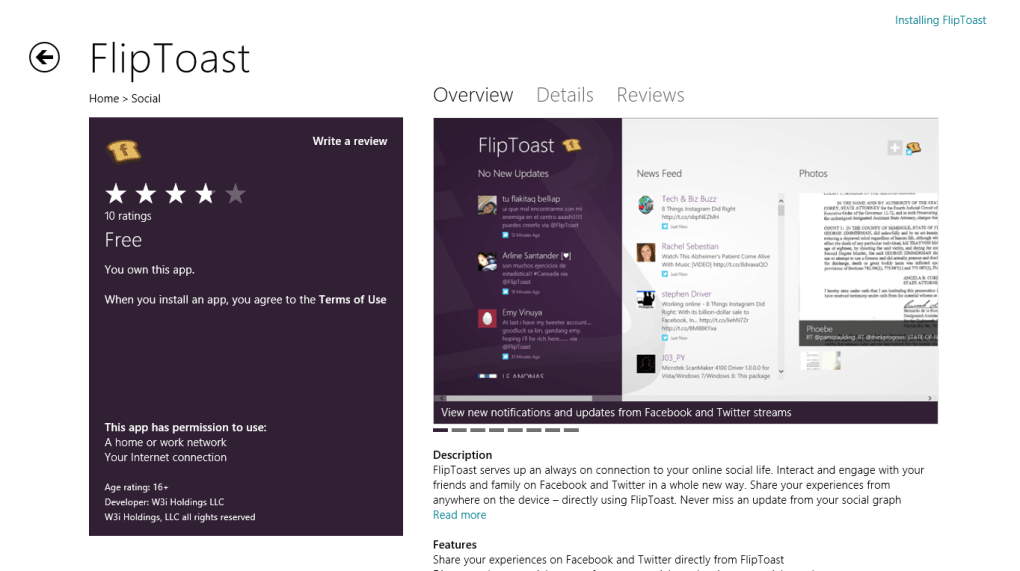
The app consolidates a “Updates” column, a “News Feed”, photo streams, birthdays, an inbox, and even a placeholder “Apps” section for quick links. However, the tool is still in its infancy: it does not support multiple accounts, direct messages, or favorite‑tweet columns, and it lacks an in‑app browser – every link opens the external Internet Explorer, interrupting the user experience. Despite these shortcomings, FlipToast provides essential interaction capabilities such as replying, retweeting, and commenting directly from the Metro tiles.
Its animated live tile keeps the latest tweets visible on the Start screen, which is a pleasant nod to Windows 8’s design philosophy. In short, FlipToast is a solid first step toward a native Windows 8 social hub, but it needs more polish, feature depth, and tighter integration before it can claim a spot alongside the more mature desktop clients.
Key Features of FlipToast
- Live‑tile integration that displays the latest tweets or Facebook posts directly on the Windows 8 Start screen.
- Unified column layout that separates Updates, News Feed, Photos, Birthdays, Inbox, and Apps for quick navigation.
- Basic interaction support: reply, retweet, and comment on both Twitter and Facebook posts.
- Touch‑optimized UI designed for the Metro experience, allowing smooth scrolling and tap gestures.
- Support for a single Twitter and a single Facebook account, making account management simple for casual users.
- Automatic content refresh, ensuring that the columns stay up‑to‑date without manual reloads.
- Lightweight installation footprint, suitable for low‑end Windows 8 devices and tablets.
- Free to download and use, with no hidden fees or subscription requirements.
Installation & Compatibility
How to Install FlipToast on Windows 8
Installing FlipToast is straightforward. First, download the installer from the official FlipToast website or the Microsoft Store if it becomes listed there. The .exe file is less than 15 MB, making it quick to download even on slower connections.
Run the installer, accept the license agreement, and follow the on‑screen prompts. The installer automatically places a shortcut on the Start menu and registers the live tile for automatic updates. After installation, launch FlipToast from the Start screen; the app will request permission to access your Twitter and Facebook accounts.
Sign in with your credentials, and the application will begin synchronizing your feeds.
System Requirements and Operating System Support
FlipToast is built for the Windows 8 Metro environment, requiring at least Windows 8 (Build 9200) or later. The app also runs on Windows 8.1 with full compatibility. For users still on Windows 7 or XP, a legacy desktop version is available, but it does not include the live‑tile or Metro‑specific touch features. Minimum hardware requirements include a 1 GHz processor, 1 GB RAM, and 200 MB of free disk space. Because FlipToast is a lightweight Metro app, it runs smoothly on tablets, convertibles, and low‑power notebooks.
After the initial setup, FlipToast checks for updates automatically every time you log in. The developer promises regular security patches and feature enhancements, though the update cadence has been modest so far. Users can manually trigger a check for updates from the Settings menu, which will download any available patches without requiring a full reinstall.
Pros & Cons
Pros
- First‑ever native Windows 8 Twitter client with Metro‑style UI.
- Live‑tile support keeps your feed visible on the Start screen.
- Touch‑optimized design makes it comfortable on tablets and convertible laptops.
- Free download with no hidden costs.
- Simple, column‑based layout for quick scanning of multiple content types.
Cons
- No in‑app browser – links open external Internet Explorer, breaking immersion.
- Limited account management – only one Twitter and one Facebook account supported.
- Missing direct‑message and favorites columns, reducing functionality for power users.
- Interface quirks, such as inconsistent interaction capabilities across columns.
- Apps and games section acts only as bookmarks, offering little value beyond opening IE.
FAQ & Final Thoughts
Is FlipToast completely free to use?
Yes, FlipToast can be downloaded and used at no cost. There are no subscription fees or hidden charges, although future premium features could be introduced.
Can I use FlipToast on Windows 10?
FlipToast was designed for Windows 8 Metro, but it also runs on Windows 10 in compatibility mode. Some Metro‑specific visual effects may appear slightly different.
Why does clicking a link open Internet Explorer?
FlipToast does not currently include an embedded web view, so it defaults to the system’s default browser, which is Internet Explorer on Windows 8. The developer has acknowledged this as a priority for future updates.
Can I view direct messages or favorite tweets?
No, the current version lacks dedicated columns for direct messages and favorited tweets. These features are on the developer’s roadmap but not yet implemented.
How secure is my login information within FlipToast?
FlipToast uses OAuth authentication for both Twitter and Facebook, meaning your credentials are never stored locally. The app communicates over HTTPS, providing a secure channel for data transmission.
Conclusion – Should You Download FlipToast?
FlipToast represents a promising step toward a native social‑media hub for Windows 8’s Metro environment. Its live‑tile integration, touch‑optimized layout, and free price point make it an attractive option for users who want quick access to their Twitter and Facebook streams without the bulk of a full desktop client. However, the lack of an in‑app browser, limited account handling, and missing direct‑message support can be frustrating for power users.
If you are a casual user who values a lightweight, Metro‑styled experience and are comfortable switching to Internet Explorer for link navigation, FlipToast is a solid choice. For those who need comprehensive social‑media management, you may want to keep an eye on future updates or consider alternative clients until FlipToast matures. Ready to try the first Windows 8 Twitter client?
Download FlipToast now and experience the Metro‑style social feed for yourself.







